Your whole job search. On your machine. Not theirs.
Job hunting scatters your résumé, your pipeline, and your interview practice across a dozen clouds that own your data. This toolkit runs all of it locally, on your own key — scan every board, tailor a truthful résumé, prepare across every interview dimension, rehearse out loud, and negotiate. No SaaS, no telemetry.
scan → apply → prepare → interview → negotiate → land · your API key · nothing phoned home
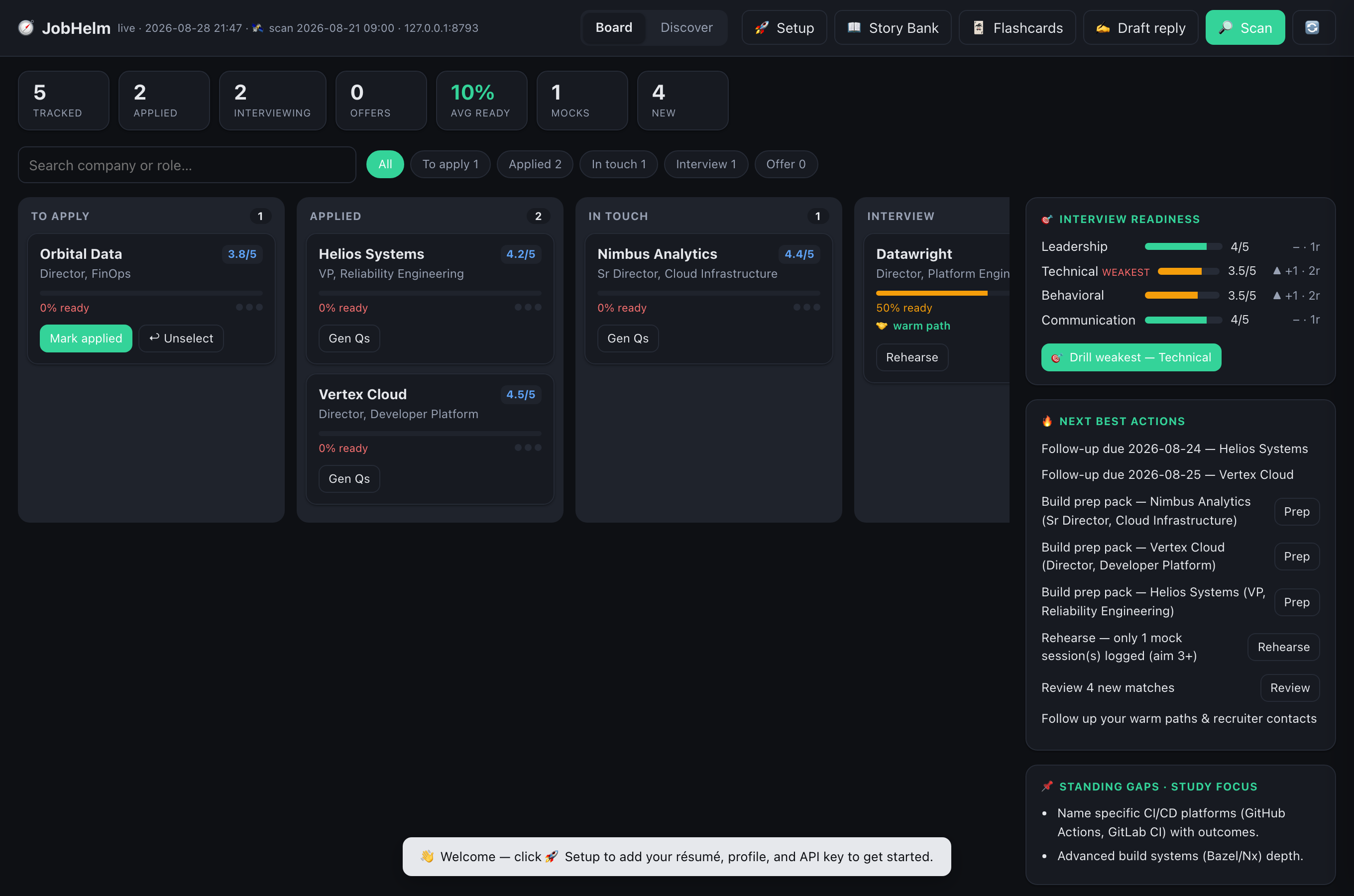
The command center — your entire pipeline, prep-readiness per dimension, and the next best move. Runs on bundled sample data the moment you clone.
🔒 Local-first⚖️ MIT licensed📡 No telemetry🧭 Any profession🖥 Mac · Windows · Linux🆓 Free on Gemini's free tier🔑 Your own key & model
The toolkit
One local-first companion for the whole search.
Two engines, one repo. JobHelm is the command center that runs the journey — scan, match, apply, connect, prepare, negotiate, land. DeskMock is the rehearsal engine you practice out loud with. Everything is grounded in your real CV, on your own machine and key — and it's a loop: what you learn in each interview feeds straight back into sharper prep.
Prepare is where the learning stack lives. Two feedback loops make it compound: your rehearsal scores drive what you drill next, and each post-interview debrief captures the real questions asked and feeds them back into prep. Every artifact stays grounded in your real CV — the loop makes you sharper, never less truthful.
How it works
Organized around your search — stage by stage.
Not a pile of features. Each stage of the journey has the tool it needs, and they hand off to each other.
🔎 Find & apply
get in front of the right roles, truthfully
🔎
Scan & Discover
Sweep every board — ATS at the source (Greenhouse/Lever/Ashby/Workday/iCIMS) plus aggregators — then rank the firehose into a shortlist of recent, on-target roles.
📄
Tailor a truthful résumé
One click tailors your résumé to a JD. Gates check every claim traces to your CV, flag AI-tells, and strip metadata — so it reads human, never invented.
🗂
Pipeline board
Every application as a card across stages, with fit scores and filters. Click a role to drill into readiness, gaps, warm paths, and one-click actions.
✍️
Draft replies & outreach
Draft recruiter/HM responses and warm-path notes in your voice. Flags spam. Never auto-sends — you review and send.
📚 Prepare
the learning stack — active recall, not re-reading
📚
Prep pack, by dimension
Per role: Leadership · Domain · Behavioral · Articles — JD-specific questions with model answers, plus live-fetched recent articles. It reads your CV and adapts to your field — finance gets modeling & GAAP, not Kubernetes.
📖
Behavioral Story Bank
Your real STAR stories, extracted once and tagged by competency, with a question→story map. Master a few true stories, answer anything.
🃏
Flashcards + spaced repetition
Active-recall deck from your CV (your metrics, behavioral triggers, concepts) with an SM-2 scheduler. Hard cards resurface sooner.
🎯
Readiness & drill the weakest
Rehearsals score you per dimension and chart the trend. One click generates an escalated drill for your weakest area. Practice → measure → drill.
🎤 Interview & negotiate
rehearse for the moment that decides it, then close
🎤
Rehearse — out loud (DeskMock)
A full mock interview: questions read aloud, you speak your answers, feedback + a per-dimension scorecard. In the Terminal or in the browser. See it below ↓
💰
Negotiation prep
Per offer: a comp benchmark (clearly flagged to verify), your leverage from the CV, anchoring scripts, and scenario responses.
📝
Debrief → question bank
After an interview, paste your notes. It captures the real questions asked and feeds them back so your next prep for that company is sharper.
🔒
Truthful by construction
Every résumé, answer, and card is grounded only in your real CV, with metric-trace gates throughout. The loop makes you sharper, never inflated.
See the command center
1Your whole pipeline
Every role by stage, with fit score and prep-readiness. The right rail charts interview readiness per dimension with a "drill weakest" button. Story Bank and Flashcards live in the header.
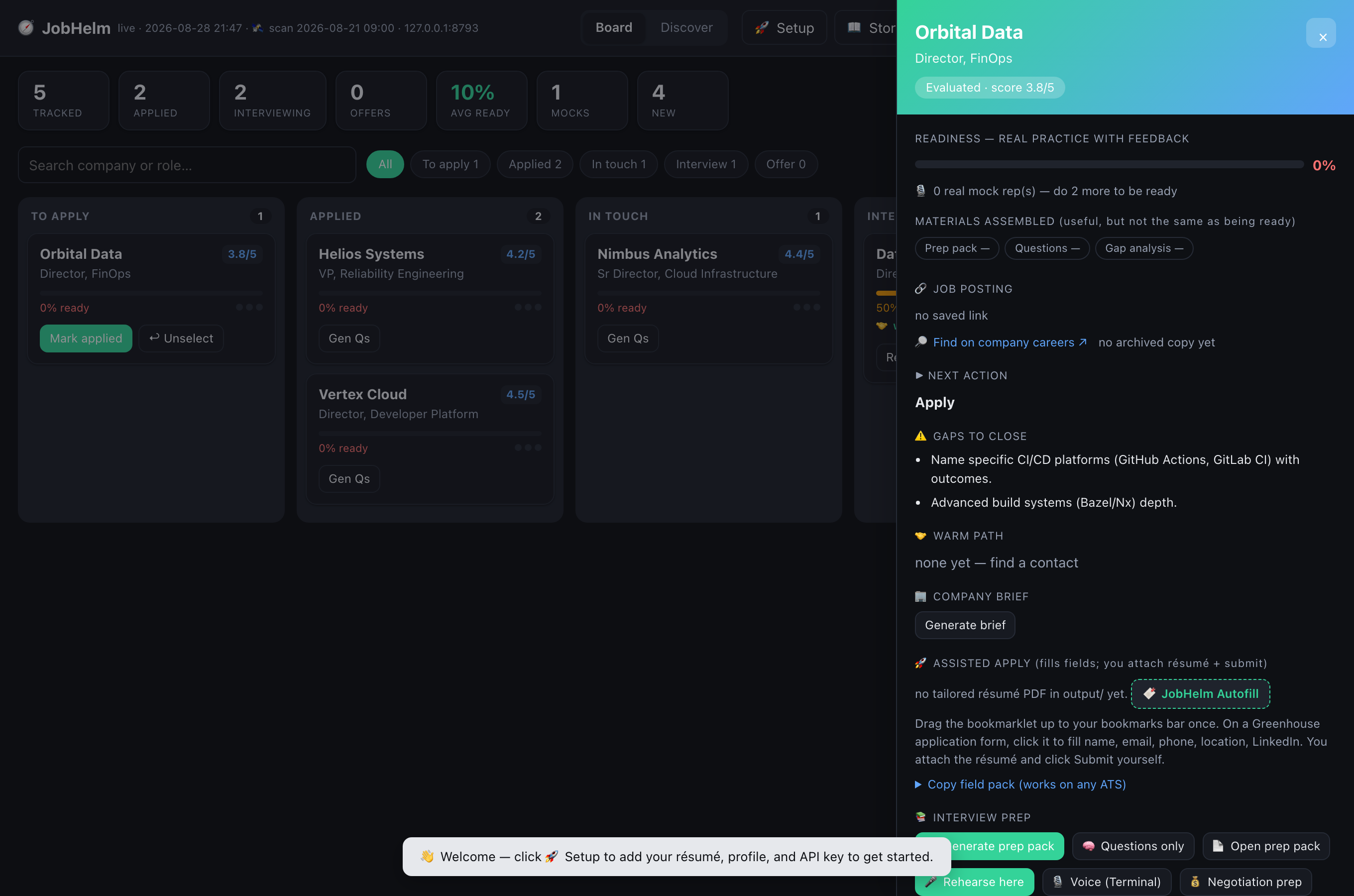
2Drill into any role
Open the drawer: readiness, gaps, warm path, assisted apply, and a full Interview Prep row — attack each round (Leadership / Technical / Behavioral / Articles), rehearse, and negotiation prep.
The rehearsal engine · DeskMock
Rehearse the interview — out loud, on your machine.
Most AI mock-interview tools are cloud SaaS or need a real-time voice stack (LiveKit + cloud speech, often a GPU). DeskMock takes the opposite stance: keep the voice local, keep the brain swappable, keep it a single command. On-device dictation captures your spoken answer and only text reaches the model — on your own key. Point it at a local LLM and nothing leaves your machine at all.
deskmock — mock interview
$ python3 deskmock.py --speak --auto --role "Platform Director" --company "Acme"🔊 Interviewer ▸ Walk me through the most recent platform you
standardized for a large org. What were your criteria and the outcome?
(dictate your answer — DeskMock reads it from the clipboard on Enter)🎙 You ▸We consolidated three Kubernetes estates into one paved-road
platform; measured on DORA metrics and a 30% infra cost cut…🤖 Feedback ▸ Strong outcome + metrics. Tighten with STAR:
name the trigger and your specific decision. Power phrase:
"single paved road, measured by change-fail rate."
QUESTION ▸ How did you drive adoption across resistant teams?
/done → scorecard · /repeat → hear it again · /skip
macOS say reads questions aloudLocal dictation → clipboardAny OpenAI-compatible LLMPer-dimension scorecardTranscripts saved locallyReadiness counts real reps
Each rehearsal is scored per dimension and feeds JobHelm's readiness chart — which tells you exactly what to drill next. Prefer to keep hands on keyboard? The same mock runs in the browser inside JobHelm.
Get started
Set up in under a minute.
One clone gives you both engines — JobHelm (the command center) and DeskMock (rehearsal). Pure Python, no dependencies to install. You need Python 3.9+ and an OpenAI-compatible API key (or a local model). Voice is optional; you can start by typing.
1 Get the code (this repo ships both tools)
git clone https://github.com/sundarshankar/deskmock.git
cd deskmock
2 Add an LLM key — grab one at openrouter.ai (create a key, add a few dollars of credit; a session costs pennies)
export OPENROUTER_API_KEY=sk-or-your-key-here# prefer a local model? skip the key and pass --base-url http://localhost:11434/v1
3 Run either engine — both work on bundled sample data
# JobHelm — the whole search (opens a demo board at http://localhost:8899)
python3 jobhelm/mission-control.py
# DeskMock — rehearse out loud (type or dictate; /done for your scorecard)
python3 deskmock.py --clipboard
🪟 On Windows? Same steps, PowerShell syntax — set the key with $env: and run with python:
Both run out of the box on the bundled samples (macOS, Windows, and Linux), so they work the moment you clone. Point them at your own CV / job search when you're ready — see the docs. For DeskMock's read-aloud voice + hands-free dictation, add --speak (macOS; on Windows/Linux you type your answers).
Run it free on Google's Gemini tier instead of OpenRouter: $env:JOBHELM_API_KEY="…", $env:JOBHELM_BASE_URL="https://generativelanguage.googleapis.com/v1beta/openai", $env:JOBHELM_MODEL="gemini-2.5-flash" (use export on macOS/Linux). A free AI Studio key is enough.
Is this a mock-interview tool or a job-search tool?
Both — it's one toolkit for the whole search. JobHelm runs the pipeline (scan, apply, prepare, negotiate, track); DeskMock is the rehearsal engine you practice out loud with. They ship in one repo and hand off to each other: rehearsal scores drive what you drill, and debriefs feed your next prep.
What stays on my machine?
Your data, your pipeline, your transcripts — there are no servers run by this project and no telemetry. The only thing that leaves is the text sent to the LLM provider you configure (your CV, a JD), on your own key. Point the model at a local endpoint (vLLM / Ollama) and nothing leaves at all. Dictation is on-device; your voice is never uploaded.
Does it work for non-tech roles?
Yes. The prep reads your CV and adapts to your field — a finance candidate gets three-statement modeling, DCF, GAAP, and month-end-close questions; marketing gets analytics and attribution; nursing gets clinical protocols. It only talks Kubernetes if you do. Résumé tailoring, behavioral prep, the story bank, and negotiation are field-agnostic by design.
Which LLMs work? Can I run it free?
Any OpenAI-compatible endpoint. The default is OpenRouter with deepseek/deepseek-v3.2 (pennies per session). Or run it free on Google's Gemini free tier: set JOBHELM_BASE_URL to Gemini's OpenAI-compatible endpoint, JOBHELM_API_KEY to a free AI Studio key, and JOBHELM_MODEL=gemini-2.5-flash. Local models (Ollama/vLLM) work too.
What operating system do I need?
macOS, Windows, or Linux. The whole search — board, prep, résumé tailoring, scanning, and in-browser rehearsal — is cross-platform (files open with your OS default app on each). The only macOS-only extras are DeskMock's read-aloud voice (--speak) and hands-free dictation (--auto); on Windows/Linux those step aside gracefully and you type your answers.
Is it really free?
Yes — open source under the MIT license. You only pay for your own LLM usage (or nothing, if you run a local model).
Can I trust what it generates?
Treat it as a strong assistant, not an oracle. It's AI-assisted and grounded in your real CV with accuracy checks, but outputs can still be wrong — review and verify everything, and you're responsible for the truthfulness of your résumé. Comp figures are estimates to verify; nothing here is legal, financial, or career advice. LLM features send your text to the AI provider you configure, and board scans are subject to each site's terms. See the full disclaimer.
It won't start, or shows the demo board — help?
"Address already in use" / Errno 48 means another JobHelm is still running on port 8899. Free it — macOS/Linux: lsof -ti:8899 | xargs kill -9; Windows PowerShell: Get-Process -Id (Get-NetTCPConnection -LocalPort 8899).OwningProcess | Stop-Process -Force — or run on another port with JOBHELM_PORT=8900. Seeing the demo board (Alex Rivera)? You're running it without your data — point it at your pipeline with JOBHELM_CAREEROPS=/path/to/your/career-ops. With no path it defaults to the bundled sample.